Test Runner with Instant Actionable Results
Wallaby.js runs your JavaScript and TypeScript tests as you type, streaming results next to your code. It also feeds rich runtime context to AI tools to help you write and fix code faster.
- Instant Actionable
Feedback - Time Travel
Debugger - Practical
Test Insights
Why Wallaby?
Test run results and coverage update in real time, right next to your code. Tools like time travel debugging and value explorer help you fix issues fast without breaking flow. Basic testing framework extensions are to Wallaby what Notepad is to a modern editor.
The tool is insanely fast because it calculates and runs the absolute minimum set of tests affected by your code changes; often only a single test needs to be run. No other testing tool, not even in watch mode, is capable of operating at this level of precision and efficiency.
Wallaby skills and MCP server give AI agents live access to test results, runtime values, execution paths, coverage, and dependencies — letting them deeply understand your code and solve complex problems, not just analyze files.
There is no vendor, API or framework lock-in when using Wallaby.js, because the tool is a plugin for your existing testing/UI framework and IDE. You will always be able to run your tests without Wallaby.js if you need to.
Choose your weapons



For your React application, Wallaby can run your Jest tests in VS Code faster, provide a debugging experience that has been designed for your tests that works more efficiently, and provide realtime granular test results that are more helpful.
efficiency without wallaby
efficiency with wallaby
Time Travel Debugging
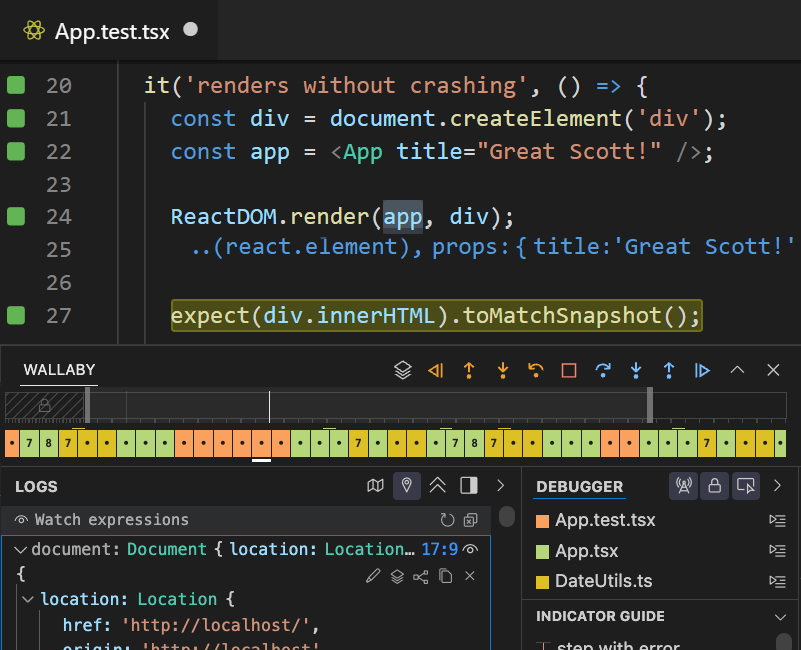
Move forward and backwards through your code to understand the conditions that led to a specific bug. Wallaby's Time Travel Debugger accelerates your edit, compile and debug loop by allowing you to jump to a specific line of code, view runtime values, edit-and-continue and step into, over and out of your code.
Fastest Test Execution
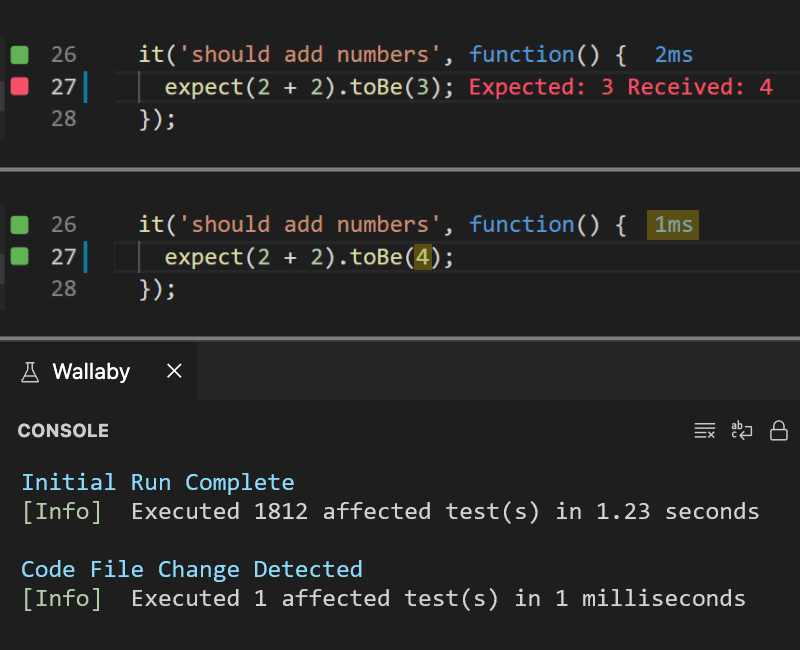
Tests run immediately as you type, on unsaved changes, and in parallel if needed, streaming results in real time. Wallaby knows how your code and tests relate, so after a change only the minimum set of tests need to re-run; no other tool is capable of operating like this. No matter how large your project grows, feedback is almost instant.
First-class AI Support
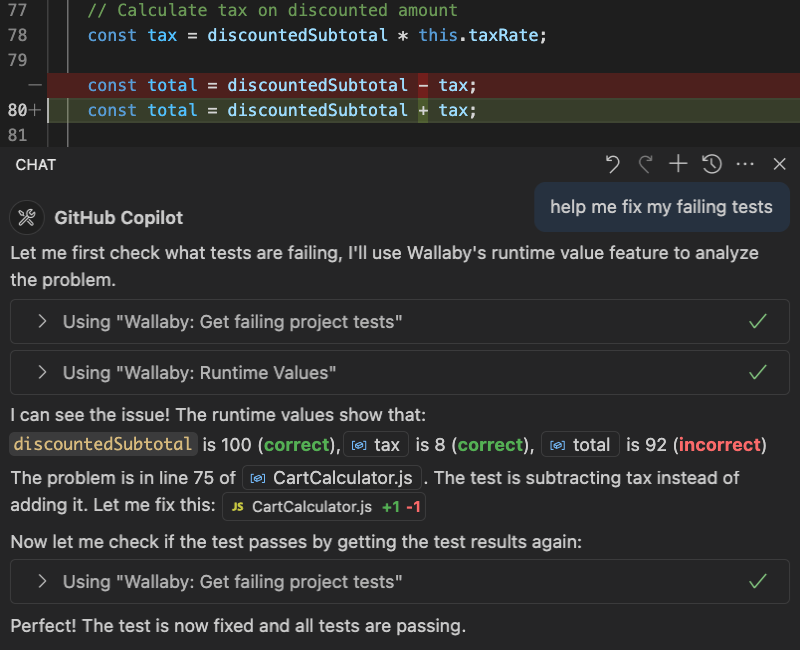
Wallaby skills and MCP server have access to live runtime values, execution paths, branch-level code coverage, and dependency graphs. Your AI assistant gets detailed insights into actual code behavior during test execution, enabling more accurate debugging and test generation. Works with Copilot Agent, Codex, Claude Code, Cursor, Windsurf, and more.
Live Runtime Values
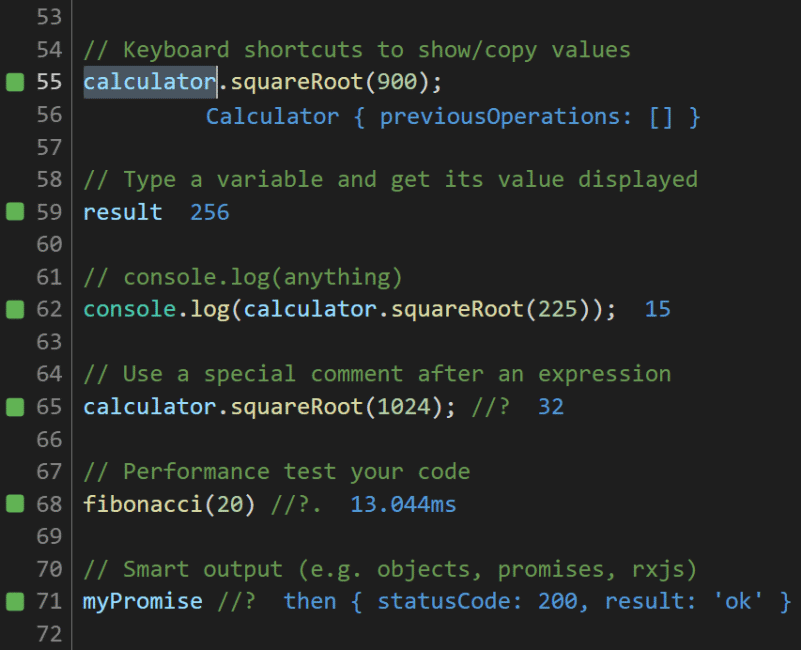
See the results of console.log and runtime variables in your editor, right next to your code. Show and copy expression values with editor commands, accessible using keyboard shortcuts. Wallaby's special comment format can also be used to evaluate expressions and includes the ability to measure code execution times.
Inline Error Reporting
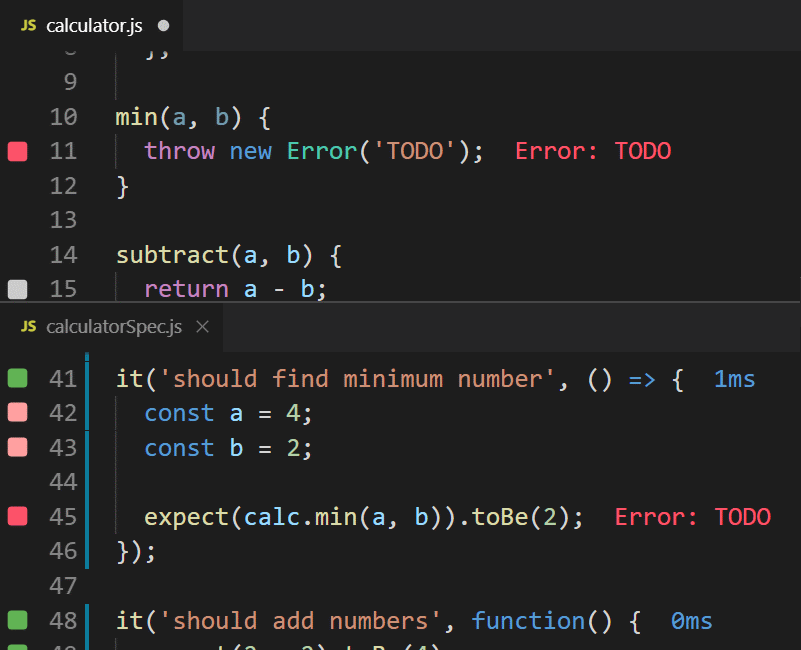
Error messages are displayed right next to the code that caused them. Gutter indicators show if the current line of code is the source of an error, or if it's on the execution path of a failing test or error. Editor commands (with keyboard shortcuts) allow you to quickly navigate to the associated failing test or error source.
Inline Code Coverage
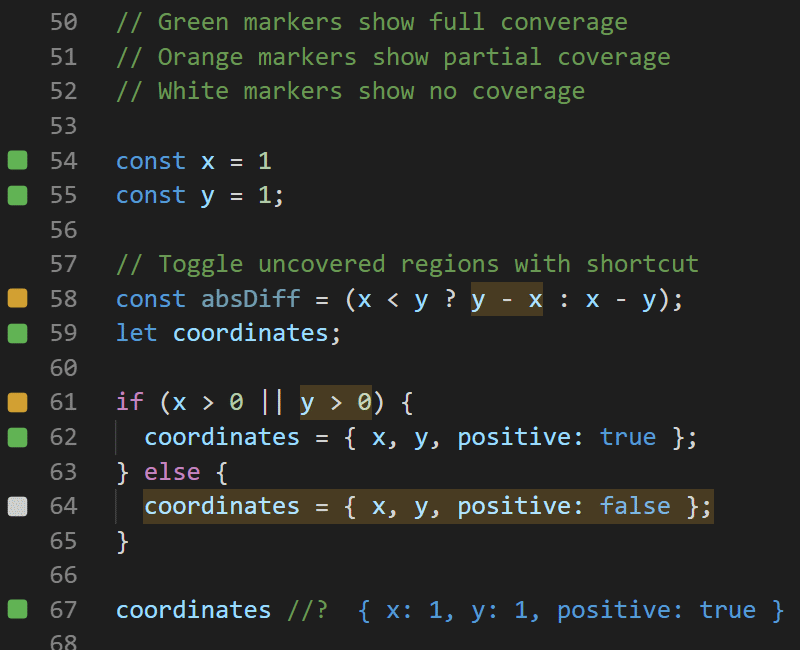
Indicators in the gutter of your code editor are constantly updated in realtime to display test coverage so you can quickly see which lines of code are fully covered, only partially covered or not covered at all. Editor commands can be used to toggle uncovered regions to see exactly which parts of your code have not been executed.
Selective Test Running
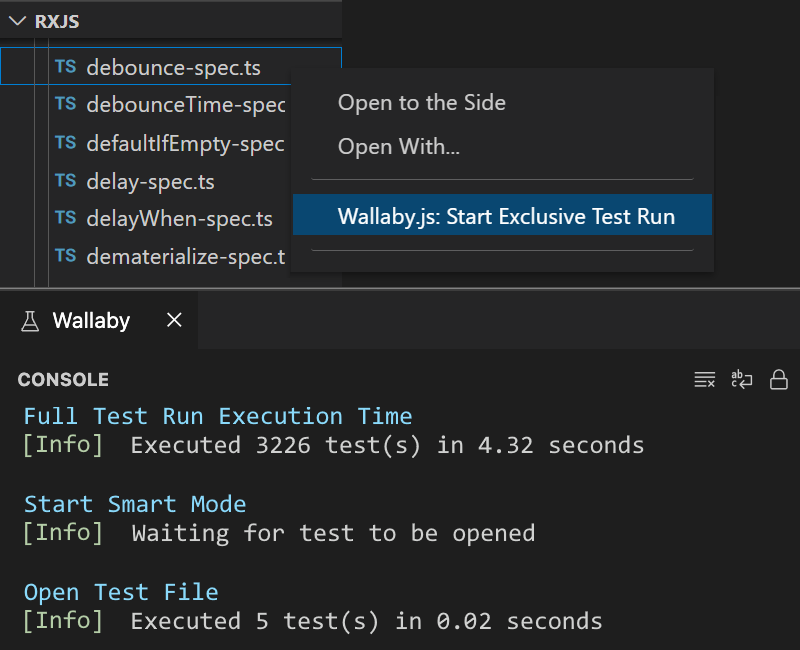
Wallaby's Smart Start and Exclusive Test Run features allow running only the test files that you are currently working on. When opening or editing test files, Wallaby will start running them. Running a limited set of tests is usually many times faster than running all tests within your project and provides a highly productive workflow.
Deep Object Inspection
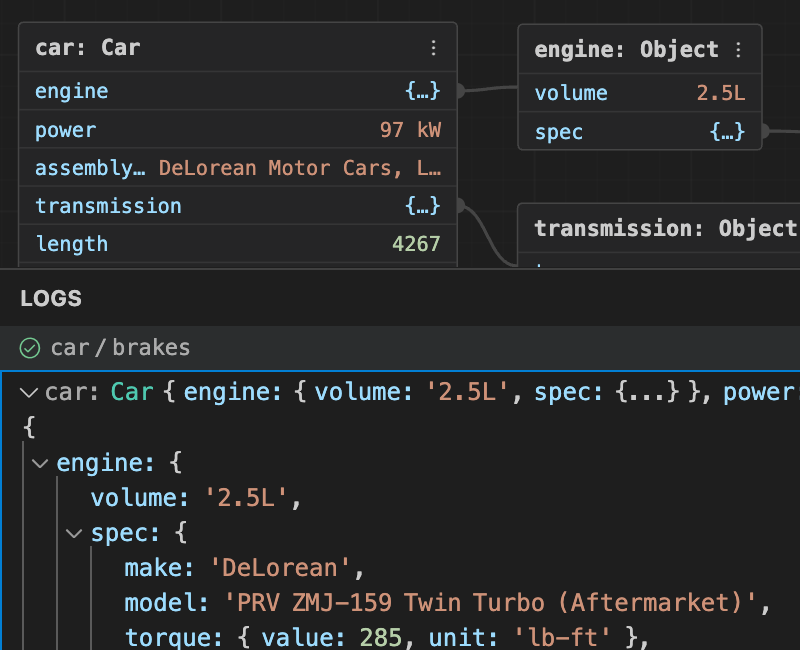
Complex data structures are displayed in an expandable, tree-like view, providing effortless exploration of deeply nested data. Each log entry includes contextual information, aiding in quickly identifying the origin of values. Interactive runtime value graphs allow you to visually explore your data.
Interactive Test Output
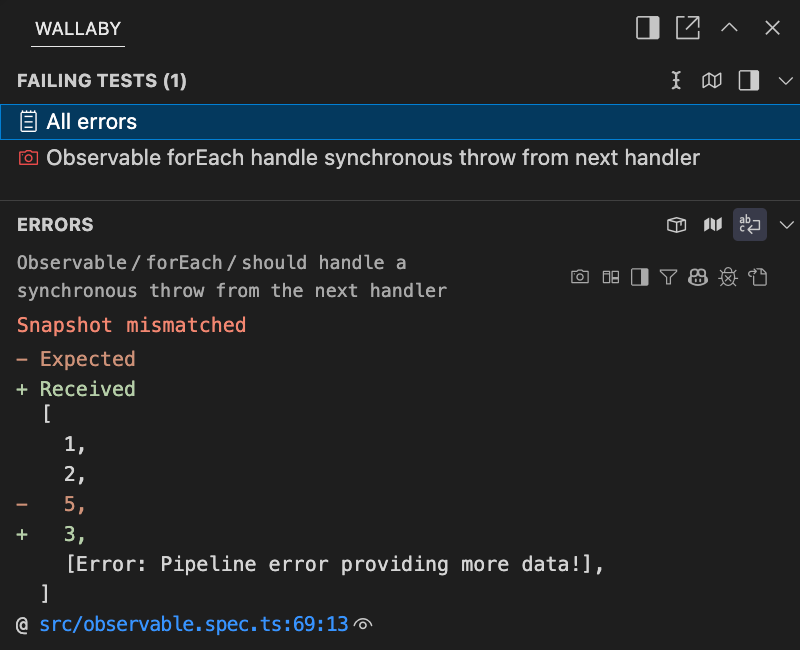
Test execution results are ergonomically displayed in your editor's output window. All tests that are currently failing are listed, along with errors, diffs/snapshots, error stacks and any console.log calls. The output window's hyperlinks allow you to navigate directly to files in your editor, for example to the exact error line, or to a broken test.
Test Execution Viewer
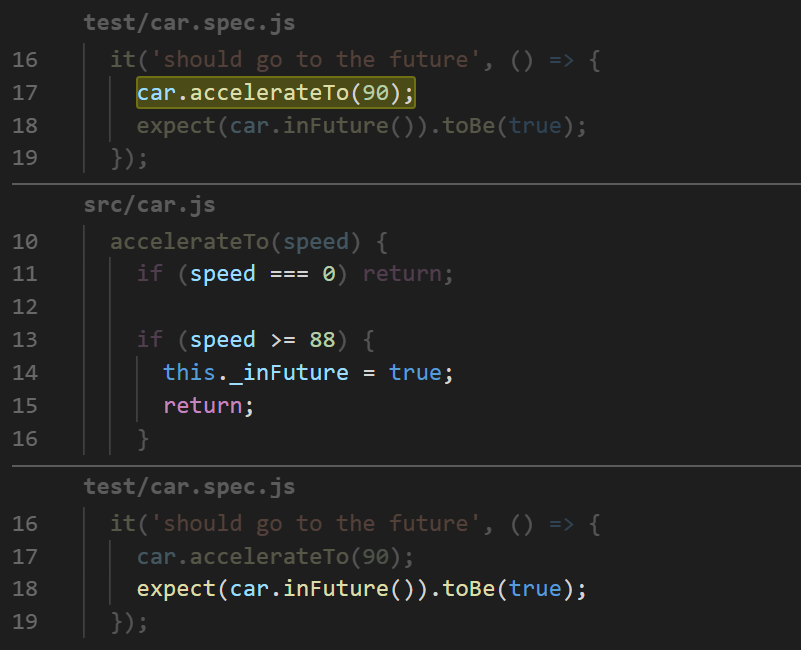
Inspect the code that your test is executing in a single logical view. Wallaby's Test Story Viewer allows you to see your test execution trace without having to jump between multiple functions or code files. It is ideal for both reading and debugging code. Quickly see covered lines of code, step into, over and out of your code, and view runtime values.
Performance Profiling
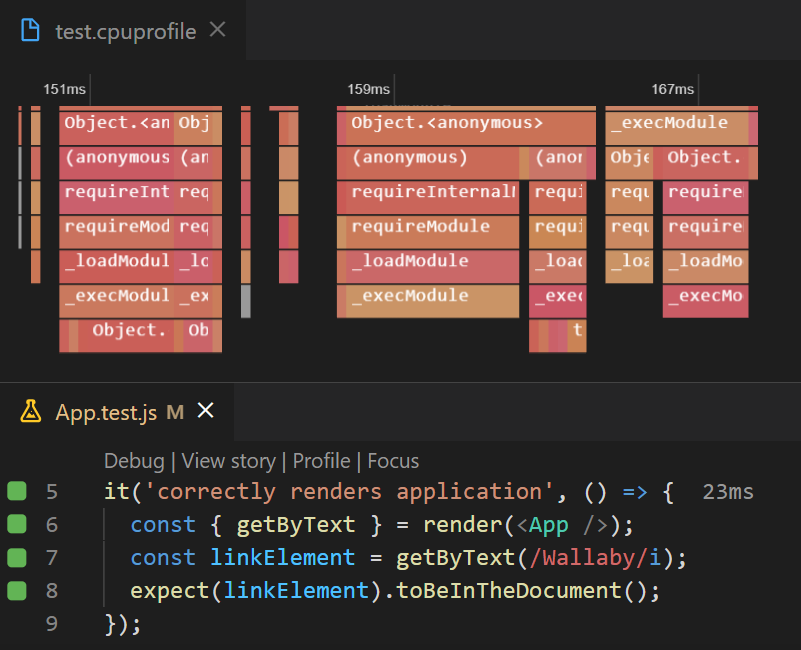
Wallaby's Test Profiler allows you to quickly record a test's CPU usage profile to analyze its runtime performance. In addition to your own test and code files, your external dependencies code is also profiled. You can quickly navigate to a section of code you want to review by clicking on the hotspot in the profile viewer.
Diff & Snapshot Management
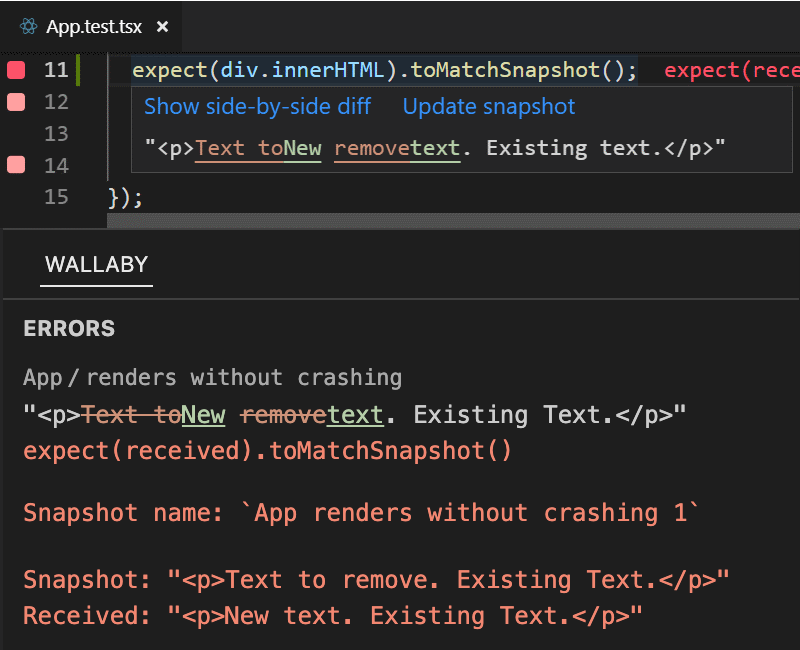
When errors contain expected vs. actual values, Wallaby displays compact diffs in editor hover tips and in Wallaby's output window. A command allows you to see the diff in a side-by-side view. Jest snapshot test support includes editor commands to update snapshots for your current test, current file, or your entire project.
Practical Test Insights
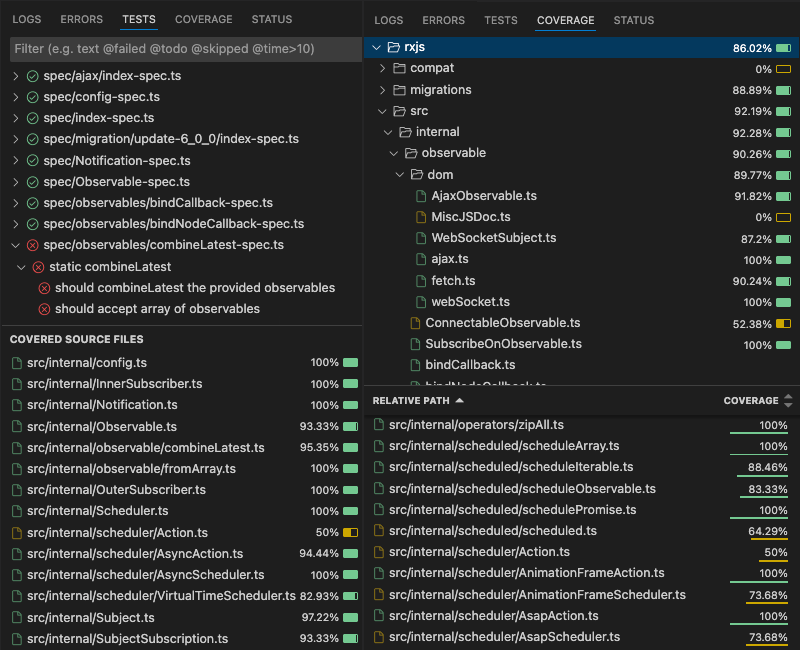
A strategic-level view of your project's tests and code coverage is available through a comprehensive side view. Open files in your editor from your browser as you explore your tests and code-coverage. Sort and filter by name, duration, passing / failing tests, and code coverage. You can also exclude code from coverage calculations.
How much will Wallaby help me?
We estimate that using Wallaby's basic features alone will make your coding 10.84% more efficient and will save you $2396 per year.
But don't take our word for it. See what our customers have to say below and try it for free to see for yourself.
10,000+ companies all over the world, including many Fortune 500 companies, have increased their productivity and output by using Wallaby.js.
























Love writing tests but don't do it enough. It is so satisfying when all tests seem to cover all corner cases and pass. To make me write more tests I purchased a license for @wallabyjs because it makes writing tests even more satisfying and faster and gives you quick overviews.
— Tim-Hinnerk Heuer (@geekdenz) November 4, 2020
I really enjoy using @wallabyjs inside @code ❤️ pic.twitter.com/akww0Ssk8m
— wassim.dev (@manekinekko) November 3, 2020
Started using @wallabyjs on daily basis for unit testing and i must say that it is probably the most useful plugin i have in my VSCode. pic.twitter.com/r9cUIojCMC
— Michael Musil (@_MichaelMusil) July 14, 2021
I love @wallabyjs, and @code makes writing tests and prototypes so much faster and enjoyable. The 10 $ per month for personal projects worth it so much #ReactJS #pwastudio pic.twitter.com/pLSPDy6go5
— Lars Roettig ⚡🤘PWA (@LarsRoettig) July 4, 2021
Reminder that @wallabyjs is probably the most useful testing tool in the JS ecosystem.
— Dave Brotherstone (@bruderstein) May 12, 2021
The tool is first rate, but the support they offer is first class too.
(I have no affiliation with them, I just love it)
I just noticed that the amazingly powerful @wallabyjs test runner now offers a free license for OSS projects! https://t.co/be4HMHce8G
— mpj 💛 (@mpjme) October 21, 2020
I can't stress enough how @wallabyjs (and Quokka.js) have been useful for the last project I've been working on. It feels like having a conversation with the code instead of fighting it.
— pcostesi (@pcostesi) October 2, 2020
Enjoying my new life with @wallabyjs tools for #vscode #allthatfreetime
— Nicolas Laplante (@nlaplante) September 23, 2020
🤓🆒
Yes @wallabyjs is great for many reasons. One reason that is never mentioned is that it implicitly teaches Unit Testing and Test-driven Development. No amount of books, videos or tutorials on Unit Testing will do for you or your mentees what 1 week with Wallaby will do.
— Vim with your soul like ether (@joeldpalmer) October 21, 2020
I renew my licence https://t.co/smRFPjdMcW today super happy about both tools. #wallabyjs #quokkajs very nice performance booster if you write a lot #JavaScript or #TypeScript
— Lars Roettig (@LarsRoettig) November 23, 2021
Renewed my @wallabyjs license. Love those sweet green rectangles in my gutter 😎 pic.twitter.com/VPAXg7Gtyd
— Stephan Meijer (@meijer_s) November 17, 2021
Decided to write a parser the other day using @wallabyjs and @GitHubCopilot
— Mark Kvetny (@biowaffeln) January 11, 2022
Such a dream combo! The whole experience was so effortless, it felt like cheating
Testing @angular and @typescriptlang using the Angular CLI inside VS @code with @wallabyjs ... I love it! pic.twitter.com/IAnNlPfq0V
— John Papa (@John_Papa) February 20, 2017
TDD with Wallaby.jshttps://t.co/Fd7Dj9aIsY pic.twitter.com/60XHxZFwVN
— Mattias P Johansson (@mpjme) January 17, 2018
To be honest, I used to think TDD was just a good idea in theory, but never had enough time to really use it on my work projects. That changed when I started using Wallaby.js. #DEVCommunity https://t.co/ZM4sKS0GCD
— DEV Community 👩💻👨💻 (@ThePracticalDev) July 19, 2020
Big up to the @wallabyjs team, your product rocks! What a bliss to have the live tests feedbacks when you practice TDD 🤩
— Stanislas Bernard (@bernanstard) October 23, 2019
Loving your work, you might enter my top-3 annual best spendings competition 🤑 pic.twitter.com/tki5ccM8go
Why wait until hitting save to know if your #JavaScript test is right?
— Cory House (@housecor) April 7, 2016
Get real-time test results with Wallaby: https://t.co/cShmvUUP9j
Just tried Wallaby.js and Im a instafan. It needs a bit of configuration (but they have updated repos with sample configurations to get you up and running) but the feedback loop it generates while writting tests/TDD is just amazing.
— Jose 'Joshi' Raez 🏳️🌈 (@JoshiRaez) June 24, 2019
Now I need this for every language plz.
Wow, I love https://t.co/gnAYShEBEg. It's probably saved me the more than the cost of a license over the past couple days! Guess it's time to buy it.
— abendigo (@abendigo) January 16, 2020
Wallaby/Quokka is a MUST-have for all #JavaScript heavy #devs.
— iPAINTCODE (@iPAINTCODE) August 19, 2022
I worked a little bit with the #trial version and have to #admit this is a #gem so went ahead and bought a license both for #wallabyjs and #quoakka. Totally sold to it and use it #daily when doing #javascript related work. Absolute recommended pic.twitter.com/lakTHgK5or
— Tom Coudyzer (@betomcou) August 5, 2020
So, @wallabyjs is literally still the best tool in the whole javascript ecosystem. Especially now it's practically zero-config.
— David Whitney (@david_whitney) October 20, 2019
Just wish it could gracefully borrow #ncrunch's "break into first broken covering test at this line" feature.
Coding with @wallabyjs easily cut my development-to-complete time in half. Can't recommend it enough.
— Sean Matheson (@controlplusb) April 4, 2016
Yes, I write tests, a lot. Both unit tests using jest and integration/e2e using Cypress. Of great help is a tool called WallabyJS (it costs money, but I'm not benefiting from telling you). WallabyJS is a continuous test runner that turns writing test into a dopamine rush⚡️! pic.twitter.com/DhZDtytU0p
— Wilgert Velinga (@Wilgert) April 17, 2020
Just wow, @wallabyjs Timetravel debugging is a revelation https://t.co/Z8gXmWnD7x
— David Whitney (@david_whitney) January 30, 2020
Success! Got the in-principle go ahead to roll out @wallabyjs at my new company!
— Steve Greatrex (@SteveGreatrex) February 15, 2018
Wallaby is incredible, and an astonishing productivity booster. I love it so much. If you haven't tried it, go go go. https://t.co/i4sETovwXm
— Tim Perry (@pimterry) January 30, 2020
Just realised that @wallabyjs has implemented the #1 item on my wish list: Focus on single test: https://t.co/j41DBH6JBv
— Mattias P Johansson (@mpjme) April 16, 2018
Going to heavily use @wallabyjs /quokka to show live results of examples. Such an amazing tool.
— 🎙️ johnlindquist 🎙️ (@johnlindquist) June 18, 2018
Just ordered a @wallabyjs + Quokka.js licence after a 15 days trial 🥳. These tools are so good ! How can we work without them 🙃 ?
— Raphaël Moreau 🚀 (@rphlmr) March 12, 2020
so @wallabyjs has a time-travelling debugger?! incredible.https://t.co/Q3v5BGNW4R
— Christopher Hiller (@b0neskull) March 24, 2020
And I did, thanks @wallabyjs pic.twitter.com/hwmqfsdgba
— let {orta} = therox (@orta) October 21, 2017
I have said this a bunch of times already. It stills needs a shoutout at least once a year.@wallabyjs adds so much productivity. Such a useful tool!
— Thomas Sattlecker (@ThomasS09) August 22, 2019
Using @wallabyjs has to be one of the best developer experience I've felt in quite a long time. Awesome! Wish I learned about it sooner.
— Jean-Philippe Sirois (@veksenn) May 9, 2018
.@wallabyjs is a continuous test runner. Check out the plugin overview in our blog: http://t.co/9KwGzfWjN9
— JetBrains WebStorm (@WebStormIDE) April 24, 2015
Loving this @WebStormIDE and @wallabyjs integration. Had gotten me further along with TDD than any other tools I’ve used before pic.twitter.com/QhnBWXuIPj
— Michael Porter (@MuddyBootsCode) May 16, 2019
#Javascript devs, have you met #WallabyJS? Slick, powerful, and…well, fun! https://t.co/mBqTZsnu1k pic.twitter.com/C05qdBBgfs
— Microsoft Developer (@msdev) February 1, 2016
And I love using @wallabyjs when unit testing . It is truly game changing
— Jonathan Marbutt (@jmarbutt) June 11, 2019
The crazy feeling when you write code / tests for a few days and it all just works when you hook it up to the frontend.
— Pavneet Singh Saund🚀 (@pavsaund) June 11, 2018
Seriously loving the TDD experience with @wallabyjs #javascript #vscode #tdd
We've started using the parallel, in-editor test runner @wallabyjs in one of our teams. Learn more about it here https://t.co/Ar1G7PHiIW
— OVO Tech Team (@OVOTechTeam) September 4, 2017
@wallabyjs I cannot believe how cool you are. I literally write more and better tests because of you. Everyone should use you. #javascript
— Deric Cain (@DericCain) August 6, 2017
I struggled for days trying to get a clean unit testing experience for Typescript. Finally tried @wallabyjs and got it working immediately and exactly what I wanted. All I do is open source dev but my time (and sanity) is well worth the price
— Phil Scott (@Philco78) June 22, 2018
I've said it before and I'll say it again - writing #javascript specs in @wallabyjs is a joy.
— Pavneet Singh Saund (@pavsaund) December 5, 2018
@wallabyjs Just renewed my licence after (nearly) daily use for a year. You’ve made unit testing easy. Thanks & keep up the good work :)
— Josh White (@__JoshWhite) May 3, 2019
Wallaby.js is pretty wicked. Works surprisingly well even when mixing TypeScript and JavaScript in the same project. It's like have NCrunch for JS, but even more insight.
— Ben Sammons (@BenSammons) January 7, 2019
Web Dev has so many nice things. Latest discovery: Wallaby. Runs tests in the background, shows state right next to the code. https://t.co/2wCuVDDwu5
— Peter Steinberger (@steipete) August 20, 2025
Lightning talk about @wallabyjs tonight! ⚡ pic.twitter.com/1B5DT9B1bZ
— Software Crafters Montreal (@swcraftmontreal) January 9, 2020
If your new company is doing TDD, and you guys are not using @wallabyjs, you are definitely missing out! Look into it and spread the word in your team, you’ll be the new hero! The cost of licence is nothing compared to the productivity boost! pic.twitter.com/2NKkbHiwKy
— Daniel Ormeño (@danielormeno) April 6, 2019
. @tbandixen & @GassmannT explain #angular testing with @KarmaJS & @wallabyjs with @code at #dotnetday17 / @trivadis pic.twitter.com/OVViOIBIem
— DotNetDay CH (@dotnetday_ch) May 23, 2017
I use @wallabyjs, it works great in VS Code (our unit tests themselves are mocha and chai).
— Mark Kawakami (@skippykawakami) April 16, 2019
Beautiful Seamless JavaScript Testing in 10 Minutes with Wallaby.js: https://t.co/R8LlVXibm4 pic.twitter.com/JpviFJLWUy
— JavaScript Daily (@JavaScriptDaily) September 14, 2015
Worked on reducing down the 30 second wait for 1800 angular unit tests to run in Karma. Got it down to, well, instant with @wallabyjs :D
— Andrew Shelton (@Sheltonial) March 4, 2015
Last week I started using the trial version of @wallabyjs ( after @_ojkwon added it to danger) - it’s stunning.https://t.co/lh3NHtSqOM
— let {orta} = therox (@orta) October 21, 2017
Got @wallabyjs to continuously run Jest tests in @WebStormIDE and it's the best thing ever 😍 👏
— kitze (@thekitze) November 25, 2016
📖 Sample config: https://t.co/OWP4zaXnuE pic.twitter.com/AFvvqjHsMO
one of my favourite dev tools just got the MCP treatment and its a game changer! https://t.co/MaY8zolTZ1
— Steve Liles (@steveliles) April 25, 2025
TDD with @wallabyjs is also great when at the start of your work day you struggle to remember where you left off the day before. pic.twitter.com/Q88adgouzG
— Hendrik Liebau (@KingHenne) May 30, 2017
Refactoring using @wallabyjs is a dream!
— Pisman Kwinten (@KwintenP) November 11, 2016
I can not emphasize enough how awesome @wallabyjs is. I can not imagine development without it anymore! Keep up the nice work. https://t.co/2eoZrxMzeF
— Thomas Sattlecker (@ThomasS09) July 26, 2017
Nice. For me the best tool is @wallabyjs. I can highly recommend it 😉
— Simon Hoss (@simonhoss88) May 27, 2019
Since I've bought @wallabyjs my code coverage went sky-high. Never thought that this would happen.
— Damian Kamiński (@_dkaminski_) March 21, 2016
Using live code comments /*?.*/ with @wallabyjs in VS @code to measure execution time while writing #js is a mind blowing experience.
— Pierre Arnaud (@epsitec) May 1, 2017
Whoaa. The company I work for just bought me a @wallabyjs license. Unit testing has never been so easy. #javascript
— Edvins Antonovs (@edvinsantonovs) November 14, 2016
This is such an amazing tool, I use it every day and it keeps getting better https://t.co/JSbJVwGfXQ
— Dave Taylor (@davetayls) July 26, 2017
WallabyJS just gave me super powers.https://t.co/b9wEC7mIDR
— Matthew Thornton (@Thornton_Matt) March 20, 2016
im only writing tests because @wallabyjs is awesooome :)
— Arnelle Balane (@arnellebalane) March 4, 2016
I believe that I have to mention at least once a month how freaking awesome @wallabyjs is. Been working with it for 2 years and still love it every day. Worth every penny and great support. Thx @ArtemGovorov
— Brecht Billiet (@brechtbilliet) December 13, 2017
Oh yeah! We use it in every @strongbrew_io workshop so far! #tdd
Not a fan of testing? With https://t.co/EVC6zHAaO6 #wallaby you will be
— LondonJavascript (@thelondonjs) September 6, 2016
Do you write React components?
— Seth Blanchard (@SethBlanchard) December 5, 2019
Do you unit test* them?
If so you might want to check Wallabyjs - https://t.co/SFYoUCGlsq
It has made my test writing significantly faster (and more fun!)
*I'm not fanatical about unit testing - sometimes I find it helpful
WallabyJS is beautiful.
— Jared McCluskey (@Kluskey) May 23, 2019
For me barrier to doing TDD has always been better tooling esp in large projects, @wallabyjs however has changed that for me
— Nimesh Gurung (@nimgrg) October 4, 2016
Thank you @wallabyjs, an unlivable-without tool
— Alpha Shuro (@alphashuro) February 17, 2016
Just bought my @wallabyjs freedom licence. Its rare that a tool can have such a big impact on my workflow so quickly, I highly recommend it!
— James Henry (@MrJamesHenry) July 26, 2016
Just setup @wallabyjs after not having used it in a while. #AMAZING and worth every penny!
— Matt Apperson 📱👱🏻 (@mattapperson) April 15, 2017
@wallabyjs you make every day working with javascript/typescript more rewarding. Awesome tooling!!!!
— Ken Snyder (@yankeeinlondon) August 13, 2017
Once you try @code + @wallabyjs is hard to live without them.. #typescript #javascript pic.twitter.com/NjHt6pMiOR
— Remo H. Jansen (@OweR_ReLoaDeD) February 15, 2016
Best tool ever for JavaScript. @wallabyjs https://t.co/eUtO2ObEGH
— Tyler Garlick (@TylerGarlick) October 10, 2017
the time has come to renew my @wallabyjs license. I have never spend $100 so happily. It remains my most important tool!
— Dave Benjamin (@zpydee) April 6, 2017
@wallabyjs Seriously great tool, esp running only changed tests/code. I have 1000+ tests & Karma was beginning to be really slow. Thanks.
— Christopher Carson (@chriscarson) December 11, 2016
Well damn, @wallabyjs is just plain awesome for JS testing and coverage. They can expect to sell us a bunch of licenses soon!
— Hilke Heremans (@HHeremans) January 28, 2016
I love your work! Doing original work on a field that's been pretty much stagnant since black/green screens were cool. 🙌
— Nir Benita (@NirBenita) March 29, 2017
@SSW_TV @dunchunter demoing @wallabyjs at #angularsuperpower , the best tool for writing #angular unit tests pic.twitter.com/6yZPFxSwfy
— Anthony Nguyen [SSW] (@anguyen1909) March 10, 2017
Set up @wallabyjs with typescript for the VS @Code extension I'm working on. There should be something like this for every language, wow
— Cody Hoover (@hoovercj) January 15, 2016
. @wallabyjs is turning into the killer app for me in VS Code. Makes writing tests so much easier. Plus the visibility of test coverage it gives me in a huge enterprise test suite makes me feel like Sauron (in a good way of course!) pic.twitter.com/eeLj72xNSc
— Ben Smith (@8ensmith) April 19, 2021
Since I bought WallabyJs license. I'm a happier developer
— Cristian Echeverria (@cecheverri4) April 13, 2021
Wallaby + React Testing Library = 🚀
Receive immediate feedback on your test coverage is great! I'm a spoiled dev.
If you're a Frontend Dev, go and do yourself a favor! https://t.co/sPDMct58aN
shout out to @wallabyjs Would have been even more difficult without the "INSTA-REPL" within the ide. Honestly, I think this has been my most favorite ide plugin in years!
— λ fp-apprentice (@fp_apprentice) April 7, 2021
I always stumble into @wallabyjs features that make me super happy.
— David Whitney (@david_whitney) March 31, 2021
This is "Advanced Logging / Live Comments".
Such a productive TDD workflow. pic.twitter.com/4YKakFPXak
wallaby is killing it again 😍. If you have a javascript testsuite, there is literally no good reason to not use this tool. https://t.co/xULtpwVLAC
— Thomas Sattlecker (@ThomasS09) January 27, 2021
Just purchased a license for @wallabyjs to use with @code. 100% worth the money, so pumped to make #TDD a more natural part of my workflow.
— Ben White (@whtouche) April 17, 2016
just improved my TDD world using @wallabyjs javascript test runner inside #VSCode.
— Piet Groot Kormelink (@pietgk) October 26, 2017
Very Cool Tool check it out :-)
Being extra productive with @wallabyjs #TypeScript and #VisualStudio @code https://t.co/e6A1Jht0Xb #javascript pic.twitter.com/X2PG76AEMU
— Remo H. Jansen (@OweR_ReLoaDeD) February 25, 2016
Now I can see realtime test coverage for RxJS in editor with @wallabyjs , great help to increase test coverage. pic.twitter.com/0gO6Cm06Fi
— OJ Kwon (@_ojkwon) October 29, 2015
can't say enough good about @wallabyjs. Not only is it an amazing tool (whole dept now using), but @ArtemGovorov is great with support.
— Justin Obney (@justinobney) October 8, 2015
Been leaning on @wallabyjs recently. The inline symbols shown per test exposed some amazing optimisation opportunities (and a few bugs). 🤘
— Sean Matheson (@controlplusb) October 30, 2017
#javascript TDD with @wallabyjs is sooo much more fun than with Karma! Thx @ArtemGovorov for the quick fix of the bug I reported
— Patrick Hund (@wiekatz) April 13, 2015
The best thing that happened to javascript development, testing suddenly became fun. #javascript #tdd http://t.co/quEnBHKjLS @wallabyjs
— João Pedro Serra (@joaaoserra) October 14, 2015
First time of using @wallabyjs all day long at my professional work. Just DOPE! Works like a charm w/TypeScript,ES6,Mocha,Sinon,Chai,Atom.io
— Jens Krause (@sectore) September 2, 2015
If you're a JavaScript dev, you have to check out @wallabyjs, you will not be disappointed, put your dev workflow on steroids.
— Wesley Higbee (@g0t4) August 19, 2015
I just did a decently complex refactor on my JS app — and using wallaby.js made it 10x faster.
— Bryan Mills (@diffkid) August 12, 2015
ahh, there is nothing like the sweet smell of 100% code coverage :)
— Dinis Cruz (@DinisCruz) August 8, 2015
Thx @wallabyjs for creating such a great tool pic.twitter.com/1YywqoEaD1
Thanks @wallabyjs for the awesome swag to give away at our testing #angular talk at #ndclondon next week you rock! pic.twitter.com/Mh56BvsRGN
— Duncan Hunter (@dunchunter) January 13, 2017
Just started using @wallabyjs for the first time in a js based web project and it is incredible!!!
— Mob Mentality Show (@mob__mentality) June 30, 2021
The test, error, and log feedback is instantaneous just like @remcomulder's NCrunch.
Development productivity in our #mobProgramming skyrocketed today🚀
-Austin
@iamstarkov tried istanbul/isparta. Didn't work well to me. Ended up using @wallabyjs. The best tool money can buy.
— Nikolay Matrosov (@nikthespirit) July 22, 2015
That moment you realise you've forgotten to start @wallabyjs and you've been wasting your time by manually running your unit tests.
— Rich Somerfield (@richie5um) November 18, 2016
Spent the day learning/writing jasmine #angularjs unit tests, have learnt! @wallabyjs makes the experience awesome
— Ken Ross (@kzhen) July 21, 2015
god damn, @WallabyJS is a FAST continuous test runner. Love it! #wallabyjs #jstests #continuoustestrunner #javascript #typescript #melike
— Mikkel Damm (@MikkelDamm) June 23, 2015
@TylorS167 about a year in now and I literally cringe when I don't have it... @wallabyjs 😍
— Justin Obney (@justinobney) December 23, 2016
WOW.. 1 minute into @wallabyjs and I'm reeaaally impressed. Now for some Babel ES6/7 preprocessing
— Einar Ingebrigtsen (@EinarI) June 18, 2015
Man, @wallabyjs is a great test runner. Good support too. 2 hours from initial bug report to them pushing a fix live. :)
— Cody Hatch (@Codayus) June 17, 2015
Great example of using @wallabyjs to debug quite a nasty bug introduced by Angular 1.6.0 upgrade (see code comments)https://t.co/7nwKdrPYaN pic.twitter.com/uAkJkNQYdA
— Dinis Cruz (@DinisCruz) December 14, 2016
thanks to @ArtemGovorov and @wallabyjs for supporting #mochajs
— Christopher Hiller (@b0neskull) January 16, 2017
Wow. @wallabyjs plugin for @WebStormIDE is a game changer.
— Justin Mandzik (@Justin_Mandzik) March 7, 2015
Huge thank you to @AngularDutch and @wallabyjs for the Wallaby license! Gave it a spin, it's both so awesome and useful to see test status & info directly in-line, as you code. And the integrated output is also extremely helpful 🥳
— Marian Stoica (@MrnStoica) December 2, 2020
Billion might be pushing it but @wallabyjs is a nice player in the commercial extension space to watch out for.
— Peter Cooper (@peterc) December 3, 2020
Check out https://t.co/OxR8W1jh67 (LIVE unit test feedback in your IDE) if you want to take this feeling to the next level.
— Peter Friese 🥑 (@peterfriese) January 22, 2023
Been messing around with the @wallabyjs license I won at last week's @AngularDutch meetup and I have to say I'm quite impressed by it. It might even make me pick up @code more often, maybe Vim integration someday? Thanks, folks! Looking forward to tonight's meetup.
— Joris Kraak (@joriskraak) December 17, 2020
Pretty impressed by Wallaby.js and Quokka.js based on this video. Definitely will give it a try! https://t.co/W8bZSyDDTP
— Johannes Schickling (@schickling) December 19, 2020
... hey @wallabyjs --- just wanted to let you know that on the last day of 2020, you've changed my life. THANK YOU! pic.twitter.com/1n4YexaDWS
— Abraham David Lloyd (@djb2c) December 31, 2020
Many thanks to @smcenlly and @ArtemGovorov for joining us to discuss Quokka.js and Wallaby.js, hosted by @vcarl_! These tools sound super helpful for speeding up JS/TS development.
— Reactiflux (@reactiflux) January 19, 2021
Recorded interview 👇https://t.co/wzEhyxk8E8